 MICHAEL
MICHAEL · Reports
An analyst is judged on the page that goes in the room.
Not the tool, not the query. Crime analysis reports are the part anyone outside the unit ever sees. MICHAEL writes five of them from the dataset you already have open: a CompStat report, a crime series bulletin, a case summary, a location profile and a briefing, each carrying your agency's logo, your analyst's name and your handling banner.
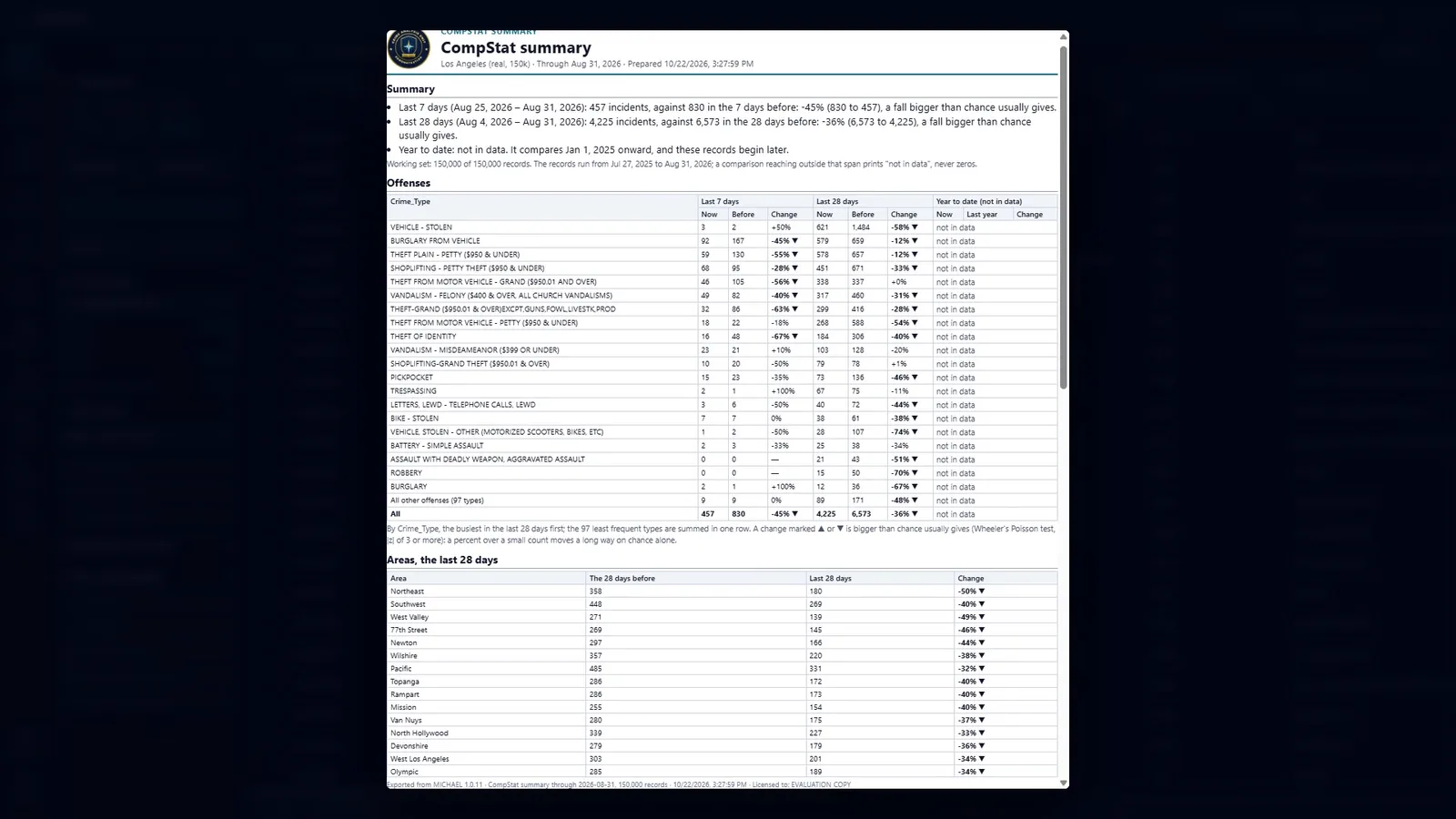
The CompStat summary, written from 150,000 records. Year to date reads "not in data" rather than counting zeros, because the records begin later than the comparison window. Public Los Angeles open crime data.
Written from the data you have open, not from a template you fill in.
Every one of these runs off the current dataset, its current filter and its current selection. Save one as a template and it runs on whatever is open next, with one click.
- CSBCrime Series Bulletin. From any series Series Finder found, or one you logged yourself. A one page patrol version for roll call, with the map large, what links the incidents, when they happen and the nearest gas stations. Then an investigator version with every incident, every linking signal, and the full canvass list.
- CSCompStat summary. The sheet the meeting runs on. Last 7 days, last 28 and year to date, each against the period before, by offense and by area, with the significant hot spots.
- CASECase summary. One record or a whole packet, each on its own page: case number, offense, when and where, the photo and a small map, the fields grouped into people, vehicles, property and method, and the narrative kept whole. Then the part the original report never had: places near it, other records at the same address, and the five most similar records with what each one shares.
- LOCLocation profile. Everything your records say about one place, or one area. Its rank and its share. The recent periods against the ones before. The offenses more common there than anywhere else. The busiest hours. The series that touch it.
- BRFThe briefing. Up to eight maps, charts and results you collected while working, with a title and your agency's logo, stamped and numbered on every page. Charts are redrawn for paper: white background, dark labels, same data and colors.
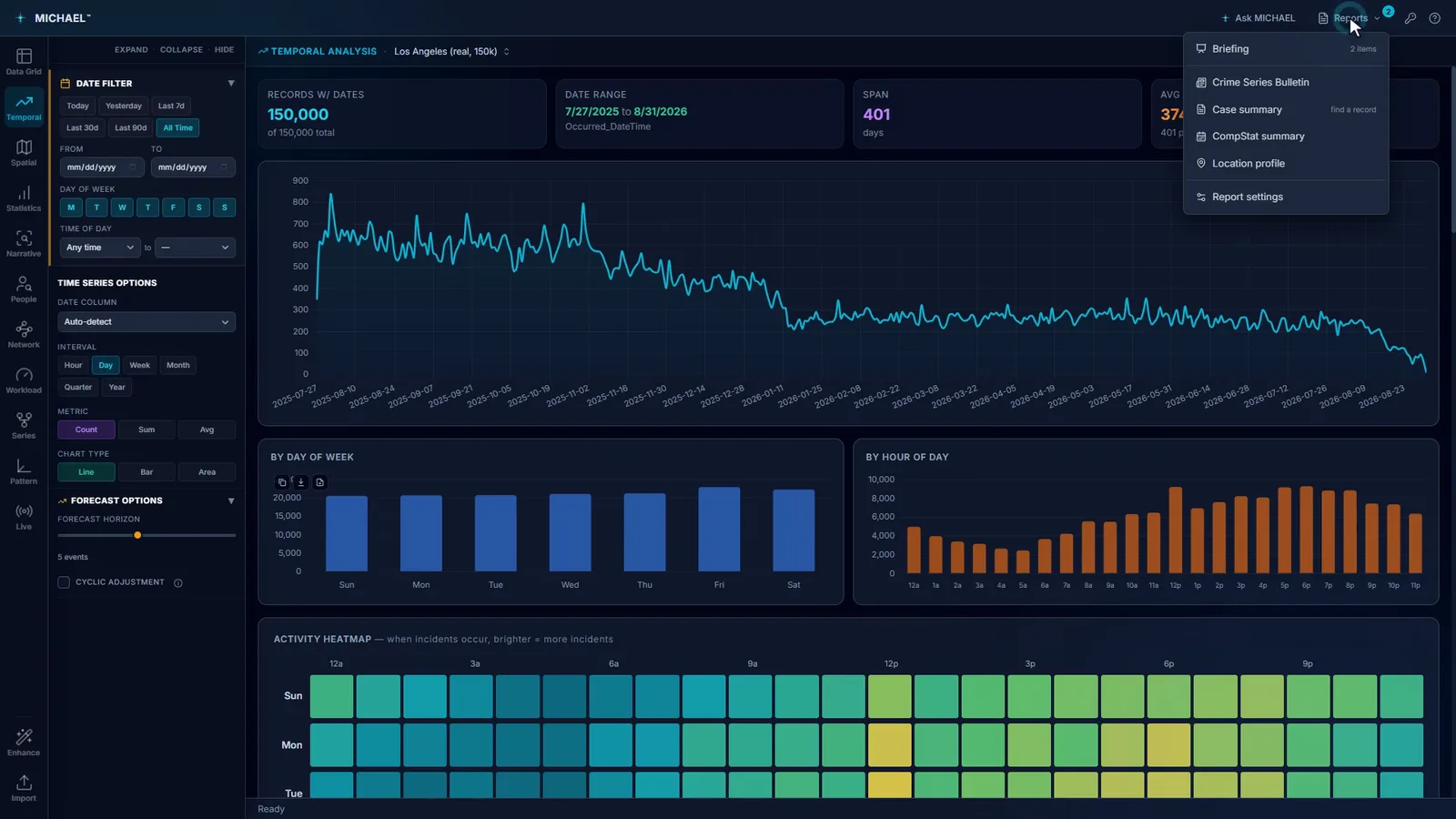
The menu counts what you have collected into the briefing as you work. Public Los Angeles open crime data.
A percent change over a small count is mostly noise.
Two robberies last week against one the week before is a 100% increase, and it is also nothing. Every CompStat sheet in the country carries numbers like that, and the room has no way to tell them from the real movements. This report marks the difference.
- 01Changes bigger than chance are marked as such. Tested with Wheeler's Poisson test, flagged at a z of 3 or more. The report states the test and the threshold on the page, so the method travels with the number instead of living in the analyst's head.
- 02It says so in a sentence, not just a symbol. "457 incidents, against 830 in the 7 days before: a fall bigger than chance usually gives." A lieutenant reads that once and has it. A triangle in a cell needs a legend and a translator.
- 03A comparison reaching past your data says "not in data". Not zero. If your extract begins in July and the report wants January, it says the window is outside the data rather than printing a 100% fall. Counting absent records as zeros is the most common way a CompStat sheet lies, and it always lies in the direction of good news.
- 04The long tail is summed, not dropped. The busiest offenses get their own rows and the remaining types are added into one row that says how many types it holds, so the totals still reconcile.
- 05It states its own working set. How many records of how many, and the dates they actually run between, printed above the tables.
The handling banner is blank until you write one.
A report that leaves the building carries whatever your policy says it carries. MICHAEL does not guess at that, and it does not put its own name where yours belongs.
- 01Your logo, your analyst's name and contact line, your banner, printed exactly as you write it. Blank unless you set one, because a wrong classification marking is worse than none.
- 02Stamped and numbered on every page. Page 3 of a report that lost its first page still says what it is and where it came from.
- 03Maps carry their credit line into the file. An exported map takes its attribution and license mark with it as part of the image, so it cannot travel without them. A screenshot pasted into a document loses both, and a map with no attribution is the one that ends up in a news story.
- 04None of it fetches anything. No logo pulled from a server, no font fetched at render time, no call home when a report is written.
It writes up your records. It does not write your conclusions.
- 01Every figure traces back to a record you can open. There is no step in any of these reports where a number appears that you cannot follow back into the grid.
- 02A report is as good as the data under it. Thin coding produces thin reports, and the report will not tell you that your agency stopped recording method of entry in March. Check the coverage before you brief the trend.
- 03No score becomes a person. None of these reports produce a threat score, a risk rating or a list of people to watch.
Try it on your own data.
Fourteen days, every feature, on one machine. Tell us who you are and we will email you your own download link. Nothing to activate. Your data stays on your machine and stays yours when the trial ends. No newsletter, no drip sequence.
Built for the people who do the work Sworn agencies, crime analysis units, public safety partners, and corporate investigation teams. Workstations are $2,500 a year, everything included. Academia and nonprofits: ask about license pricing.
Or email info@sworn.ai. A person answers.